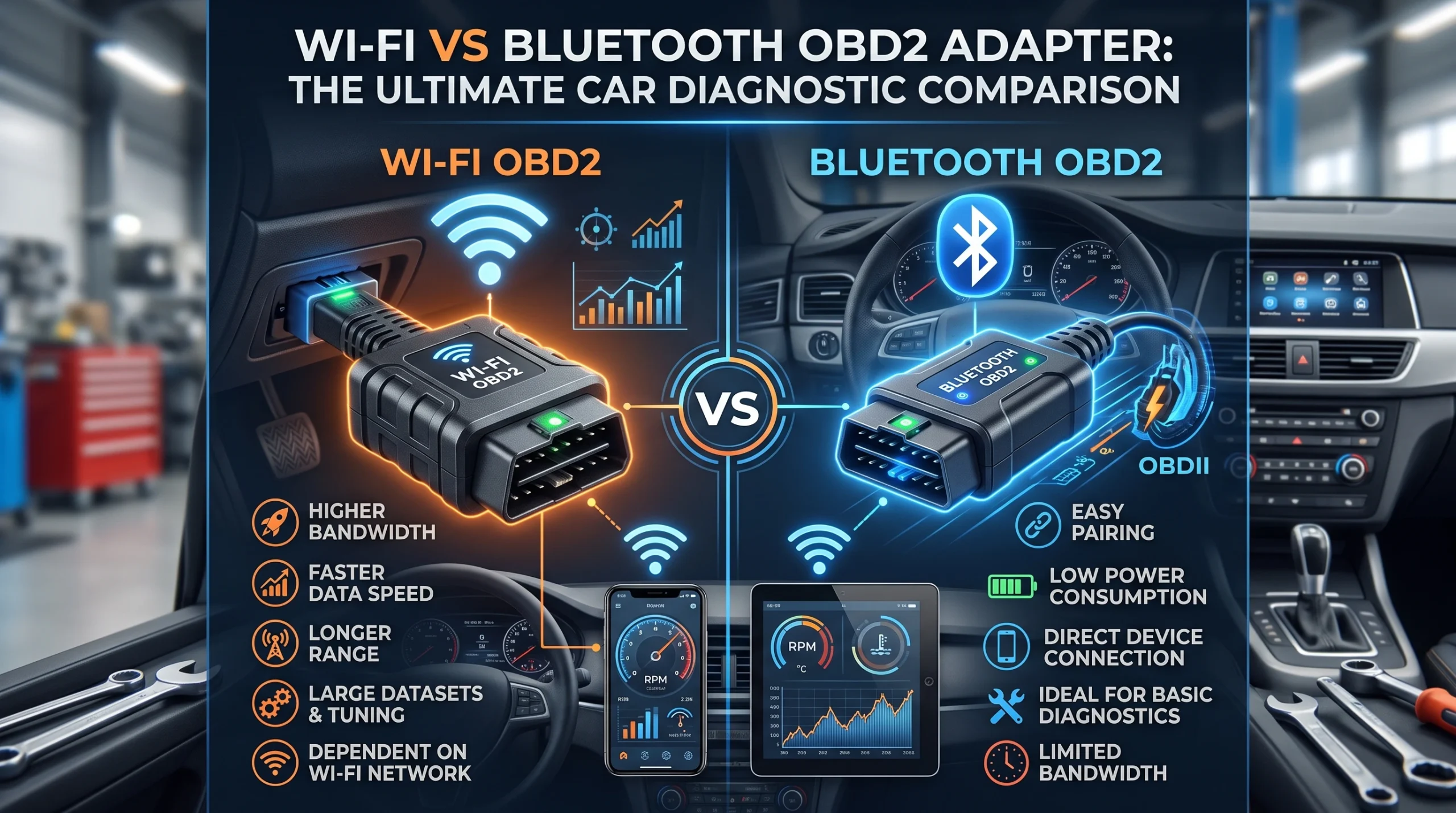
Connection type is not a minor spec. It decides whether an adapter will work with your phone at all, whether you keep a mobile data connection while you are scanning, and how likely the link is to survive a long operation. The short version: Bluetooth Low Energy is the safe modern default, classic Bluetooth is cheap but frequently Android-only, Wi-Fi works across platforms but usually takes over your phone’s Wi-Fi radio, and a cable is the one that never drops.
Classic Bluetooth: cheap, common, and the iPhone problem
The large majority of very inexpensive adapters use classic Bluetooth, and they are the reason the phrase “Android only” appears so often in this category. Apple’s platform does not generally allow arbitrary classic Bluetooth serial connections in the way Android does, so a great many cheap adapters simply cannot be used with an iPhone regardless of which app you install.
If you use Android and want the cheapest workable route, this is it, and it is a legitimate choice. If you use an iPhone, checking the connection type before you buy will save you the most common disappointment in this whole product category. It is a hardware and platform issue, not something an app can work around.
Bluetooth Low Energy: the modern default
Bluetooth Low Energy is what most current adapters aimed at both platforms use. It pairs readily on iOS and Android, uses little power, and for the data volumes involved in reading codes and modest live data it is entirely adequate.
Where it shows its limits is heavy continuous streaming: if you want many live values updating quickly at once, a low-bandwidth link is the constraint. For most owners, most of the time, that is theoretical rather than practical, and the more common bottleneck is how many values you have selected, which is covered in the ten live PIDs worth watching.
Wi-Fi: works everywhere, costs you your data connection
Wi-Fi adapters create their own network, and your phone joins it. That sidesteps the platform compatibility problem entirely, which is why they are a common iPhone answer, and it generally offers more bandwidth than a low-energy link.
The trade is specific and worth knowing before you buy. While your phone is joined to the adapter’s network, it is not on your home or mobile Wi-Fi, and on many phones that means the device will not have a usable internet connection at the same time. If your workflow involves looking things up while you scan, that is a real irritation. Some phones handle the fallback to mobile data better than others.
Wi-Fi adapters also tend to be less power-frugal, which matters if you intend to leave one plugged in. That question has its own page in can an OBD2 scanner drain your battery.
USB and cabled tools: the boring one that does not drop out
A cable does not pair, does not drop, does not care about your phone’s operating system and does not have a radio to leave awake. For anything involving a write operation, coding, module updates, service functions, that reliability stops being boring and starts being the point, because a connection lost partway through a write is the one genuinely risky scenario in this whole area.
Cabled tools are mostly handhelds with an integrated lead, or laptop-connected interfaces. The trade is obvious: you are tethered, and you are carrying a second device or a dedicated tool rather than the phone that is already in your pocket. The wider format decision is covered in Bluetooth dongle or handheld scanner.
Choosing by what you actually do
- Occasional code reads on an Android phone, cheapest workable option: classic Bluetooth is fine, and the money saved is real.
- Any iPhone user: Bluetooth Low Energy or Wi-Fi, and check which the app you have chosen expects. The app-and-adapter pairing problem is set out in OBD2 apps compared.
- Live data logging with several values at once: favour Wi-Fi or a wired tool over a low-energy link.
- Anything that writes to the car: wired, or a dedicated tool with a stable connection. Do not perform a coding operation over a link you have watched drop.
- You want one tool that always works with no phone involved: none of the above; buy a handheld, and the criteria are in choosing a beginner scanner.
One caution that applies to all of them: check what your chosen app supports before buying the adapter, not after. Compatibility in this category is specific rather than general, and connection type is only the first of the two things that have to line up.
FAQ
Is Wi-Fi or Bluetooth better for an OBD2 adapter?
Neither is better in general. Wi-Fi offers more bandwidth and works across platforms but usually occupies your phone’s Wi-Fi radio, cutting internet access while connected. Bluetooth Low Energy pairs easily and uses little power but offers less bandwidth for heavy live data.
Why does my Bluetooth OBD2 adapter not work with my iPhone?
Almost always because it uses classic Bluetooth, which iOS does not generally permit for this kind of connection. Adapters using Bluetooth Low Energy or Wi-Fi are the usual iPhone-compatible routes, and no app can work around a classic Bluetooth adapter on iOS.
Do I lose mobile data when using a Wi-Fi OBD2 adapter?
Often, yes. Your phone joins the adapter’s own network, and depending on the phone it may not fall back to mobile data while connected. It is worth testing before you rely on it.
Which connection is most reliable for coding or programming?
A wired connection. Write operations are the one case where a dropped link can leave a module in a bad state, so reliability matters more than convenience.
Does connection type affect what data I can read?
Not what data exists, but it can affect how much you can stream comfortably at once. Protocol support and vehicle coverage are separate questions decided by the adapter’s hardware and the tool’s database, not by how it talks to your phone.
AutoGearZone does not sell scanners or adapters and earns no commission from any brand or tool named here. More on how we work on our about page.